
What can the app Intrastat IDEP Export do?
The Instrastat STATEC app allows you to export Intrastat data in a predefined format whichisaccepted on the IDEP portalof STATEC (Luxembourg’s national statisticsauthority).
The Intrastat declaration is a statistical declaration that companies in the European Union (EU) must submit when they send or receive goods across EU internal borders. It serves to collect data on intra-Community trade in goods. The purpose of this is to record trade flows between EU member states for foreign trade statistics.
In terms of content, this declaration includes information on the type of goods, quantity, value, country of origin and destination, type of transaction, etc. The declaration is submitted monthly, either manually or by uploading it to the national STATEC IDEP portal. Only pre-checked formats are valid there.
With our extension, you receive this validated CSV format for uploading to the portal and can save yourself the manual entry of data. This data is based on the entries from the standard Intrastat module, which is integrated into Microsoft Dynamics 365 Business Central.
Overview of functions
- Generation of the file in the specified format (.csv) agreed with the statistics portal
- Use of the integrated standard Intrastat module from Microsoft Dynamics 365 Business Central
- Generation of separate files for shipments and receipts
Benefits for you
- Use of a format coordinated with the statistics portal
- Regular checks for changes to STATEC
- No more manual entry of large amounts of data for Intrastat reporting
- Time savings through export of all data and upload to the IDEP portal
- Fully integrated into Microsoft Dynamics 365 Business Central – with standard functionality
- Ensures that your file is valid for the IDEP portal
Technical requirements and use
- Supported editionsThis extension supports both the Essential and Premium of Microsoft Dynamics 365 Business Central.
- Supported countriesLuxembourg and Germany, other Countries upon request.
- Supported LanguagesThis app is available in English (United States) and German (Germany).
All companiessubjecttosalestax (ortheirtaxrepresentatives) whoseincominggoods and/oroutgoinggoodsexceed an annual valueof €200,000 or €150,000, respectively, arerequiredtoregister.
Yes, accordingtoArticle 13 ofthe Act ofJuly 10, 2011, respondentsarerequiredtoprovidetherequesteddata. Violationsofthereportingobligation will result in administrative proceedings. Refusaltoreport, failuretosubmitreports on time, orthesubmissionofdeliberatelyfalsereportsmaybepunishedwithfines ranging from 251 Euro to 2,500 Euro in accordancewithArticle 15.
TherearethreetypesofIntrastatdeclarations:
- thesimplifieddeclaration, whichrequires 3 piecesofdatarelatingtothephysicalmovementofgoods
- thedetaileddeclaration, whichrequires 6 or 7 piecesofdatatobereported, depending on theflowofgoods
- theextended, detaileddeclaration, whichrequires 8 or 9 piecesofdatatobereported, depending on theflowofgoods
Detailed reports and extended reports may only be submitted via STATEC’s IDEP online service. For simplified reports, you can choose between IDEP and paper forms. The deadline for submission is the 16th working day of the following month.
At the following link on the STATEC website:
Intrastat STATEC
Quick Links
Setup and Usage
The IDEP portal is an online portal operated by STATEC (Institut national de la statistique et des études économiques du Grand-Duché de Luxembourg), Luxembourg’s statistical office. It is primarily used by companies to submit statistical reports electronically, particularly in connection with the Intrastat and Extrastat systems (i.e., trade statistics for goods traffic within and outside the EU).
Since this extension is integrated into Microsoft Dynamics 365 Business Central through the installation of the app, no separate setup is required. The Intrastat report can be easily created using the integrated Intrastat functionality in Business Central. Once all the necessary data has been entered, the “Export IDEP file” function can be used in the report ribbon.
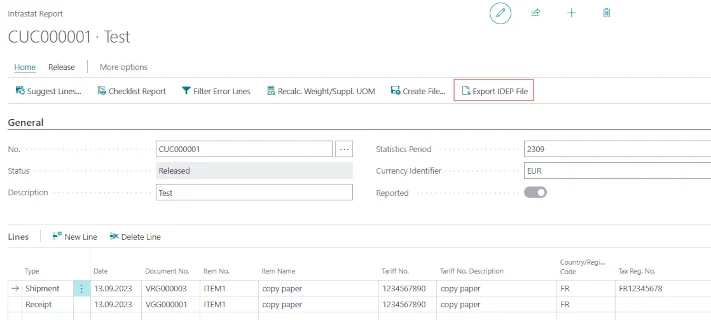
When the file is exported, the report is marked as reported and the download of the file(s) begins. Depending on the setting—whether you want to export only inputs or outputs or both—you will receive either a single file or a ZIP folder with two separate files:
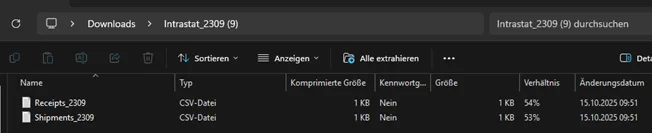
This file is now ready to be uploaded to the IDEP portal.
For more information, please contact:
Orgavision S.à r.l.
35, route de l’Europe
L-5531 Remich
Telephone +352 26660091
help.orvapp@orgavision.lu
https://www.orgavision-nav.com